Study Sweep لعبة دراسية بالذكاء الاصطناعي
رمّم غرفة قراءة ودفيئة واستوديو فضائي مع الغوبلن. في كل غرفة 24 مهمة تنظيف وإصلاح. استراحة دراسية قصيرة بعد كل ثلاث مهام تُبقي موادك حاضرة عبر الغرف الثلاث. افتح أدوات جديدة وقارن كل غرفة قبل العمل وبعده.
4.38 / 5 (50)
مجاني للعب · لا حاجة إلى بطاقة ائتمان
عن Study Sweep
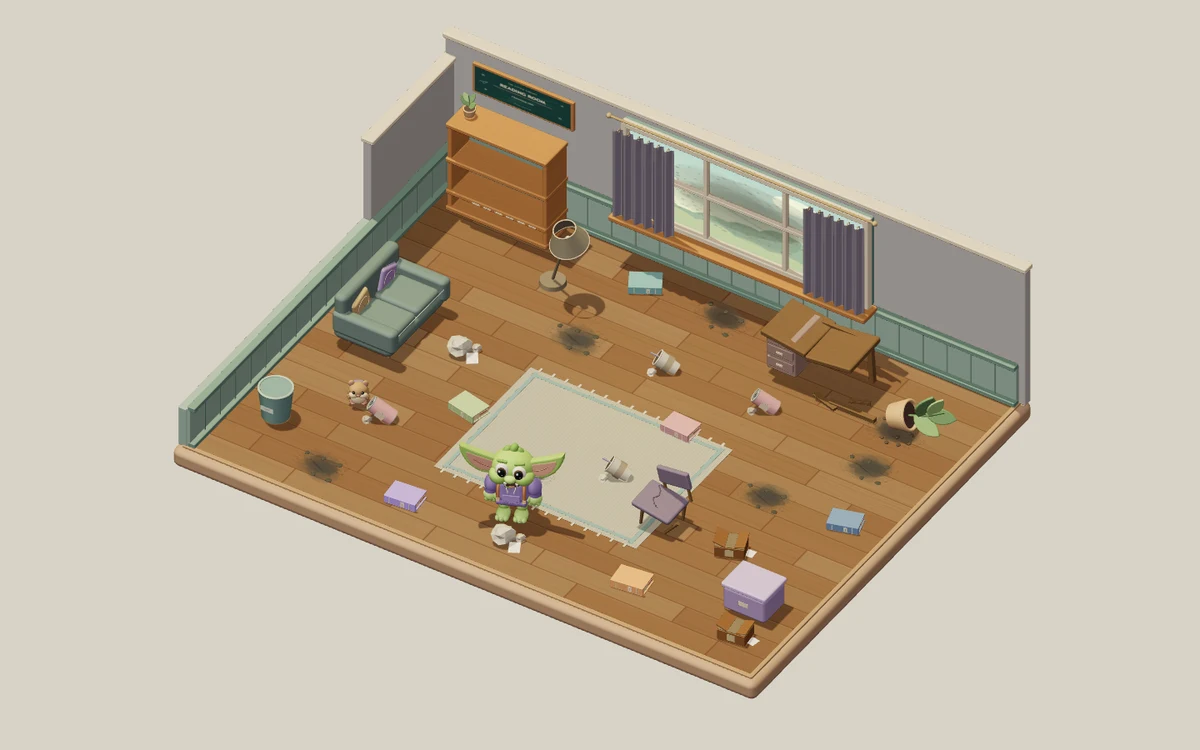
تأخذك Study Sweep: إنقاذ الغرفة عبر ثلاثة أماكن ثلاثية الأبعاد صمّمها فريق اللعبة: غرفة القراءة، والدفيئة السرية، والاستوديو الفضائي. يساعدك غوبلن صغير على ترميم كل مكان منها قبل أن تنتقل إلى التالي. في كل غرفة 24 مهمة ظاهرة: ثماني قطع قمامة، وستة كتب في غير أماكنها، وست بقع غبار، وأربعة إصلاحات للأثاث. نظّف الأرضية، وأعد الكتب إلى أماكنها، واجعل الأثاث صالحًا للاستخدام من جديد. كل مهمة تنهيها تغيّر ما تراه وتزيد عدّاد الترميم. أكمل غرفة القراءة لتدخل الدفيئة السرية، ثم رمّم الاستوديو الفضائي لتنهي الرحلة الكاملة المكوّنة من 72 مهمة.
تستمر أسئلتك الدراسية طوال عملية التنظيف. تبدأ كل غرفة جديدة بثلاث مهام متاحة قبل استراحة الدراسة. وبعد كل ثلاث مهام مكتملة، أجب عن سؤال واحد إجابة صحيحة لتصبح المهام الثلاث التالية جاهزة. وإنهاء آخر مهمة في الغرفة ينقلك إلى نتائجها دون سؤال إضافي. ويحتاج الغبار والأثاث المتضرر أيضًا إلى أدوات: إجابتان صحيحتان تفتحان المكنسة، وإجابتان تفتحان عدة الإصلاح. أما القمامة والكتب فلا تحتاج إلى أداة خاصة. وفتح أداة يجهّز ثلاث مهام أخرى، وتبقى الأداتان مفتوحتين أثناء تنقلك بين الغرف. وتستمر استراحات الدراسة المتكررة بعد أن تفتحهما.
تأتي كل الأسئلة من مجموعة الأسئلة التي اخترتها في StudyQuest، وتستمر معك عبر الغرف الثلاث مع دفتر تعلّمك. تتوقف الغرفة مؤقتًا أثناء القراءة أو الإجابة أو استخدام القائمة، دون أي عدّ تنازلي لوقت القراءة. تعرض الإجابة الخاطئة الإجابة الصحيحة وتقدّم شرحًا قبل أن تتابع؛ لكنها لا تُحتسب ضمن تدريب الأداة، ولا تسمح لك بتخطي استراحة دراسة مطلوبة. يسجّل دفترك الأسئلة التي مرّت بك وإجاباتها الصحيحة، ومنها الأسئلة التي تحتاج إلى نظرة أخرى. وتكسبك الإجابات الصحيحة نقاط الخبرة (XP) في StudyQuest. موضوعات الغرف وأغراضها بيئات ثلاثية الأبعاد تعمل في الوقت الفعلي وصمّمها فريق اللعبة، بينما توفّر المادة التي تختارها الأسئلة والمفاهيم التي تتعلمها.
انقر على الأرضية لتمشي، أو انقر على مهمة فيقترب منها الغوبلن ويبدأ العمل المناسب عندما تكون متاحة. وتتيح لك لوحة المفاتيح الحركة بمفاتيح WASD أو الأسهم، والعمل على ما هو قريب منك بمفتاح E. وعلى شاشة اللمس، المس المهام أو استخدم عصا التحكّم بالحركة. وتضم قائمة الإيقاف المؤقت إعدادات الصوت وتقليل الحركة. وعندما تنتهي المهام الـ24 كلها في غرفة، قارن بين مشهدي «قبل» و«بعد»، وراجع دفترك، ثم انتقل إلى الغرفة التالية. تنتقل أدواتك وتقدّمك الدراسي معك. وتكتمل المغامرة بعد ترميم الغرف الثلاث والمهام الـ72 كلها. وبعدها يمكنك الاستمتاع بالمكان المكتمل، أو إعادة اللعب من غرفة القراءة بترميم جديد وبالمادة الدراسية نفسها التي اخترتها.
لمن Study Sweep؟
الطلاب الذين يريدون أسئلة دراسية منتظمة دون وقت محدد بين مهام تنظيف وإصلاح يرون نتيجتها أمامهم. ثلاث غرف بموضوعات مختلفة، وقائمة من 24 مهمة لكل غرفة، ومقارنات «قبل» و«بعد» تمنح هذه الرحلة الفردية مراحل واضحة.
أفضل المواد للدراسة مع Study Sweep
المفردات والتعريفات
أسئلة التذكّر القصيرة تناسب استراحات الأسئلة المتكررة بين كل مجموعة من ثلاث مهام ترميم.
المفاهيم العلمية
تتوقف الغرفة أثناء الأسئلة، فيبقى لديك وقت لمقارنة المصطلحات وقراءة الشرح بعد الخطأ.
التاريخ والدراسات الاجتماعية
يمكنك مراجعة أسئلة عن الشخصيات والأحداث والأفكار من ملاحظاتك بين مهام الترميم التي تراها أمامك.
مراجعة منوّعة للامتحانات
تستمر مجموعة الأسئلة نفسها ودفتر التعلّم عبر الغرف الثلاث، فتبقى الأسئلة السابقة متاحة للمراجعة.
كيف تلعب Study Sweep
ثلاث غرف بموضوعات مختلفة و72 مهمة تنظيف وإصلاح
إجابة صحيحة واحدة بعد كل ثلاث مهام تُبقي التعلّم مستمرًا
الأدوات المفتوحة ودفتر تعلّمك ينتقلان معك بين الغرف
بلا مؤقّت: اقرأ بإيقاعك واستمتع بكل غرفة مكتملة
ماذا ستتعلم
الاسترجاع النشط
كل سؤال يدفع دماغك إلى استرجاع المعلومة بنشاط، ما يقوّي المسارات العصبية والذاكرة طويلة المدى.
تقييم فوري
تعرف فورًا إن كانت إجابتك صحيحة. وعند الخطأ يشرح الذكاء الاصطناعي الإجابة الصحيحة، فيتحوّل الخطأ إلى لحظة تعلّم.
حافز مُلعّب
النقاط والسلاسل وأنظمة التقدّم تُبقيك متفاعلًا أطول من الدراسة التقليدية. تدرس أكثر لأن الأمر يبدو لعبًا.
أي مادة
ارفع أي مادة دراسية: أحياء، تاريخ، رياضيات، لغات، تحضير للامتحانات. إن كانت في ملاحظاتك، تصبح لعبة.
تفاصيل اللعبة
جاهز للعب Study Sweep؟
ارفع ملاحظاتك الدراسية، ودع الذكاء الاصطناعي يولّد الأسئلة، وابدأ اللعب في أقل من دقيقتين. يعمل مع أي مادة.
لا حاجة إلى بطاقة ائتمان · خطة مجانية للأبد