Study Sweep Juego de estudio con IA
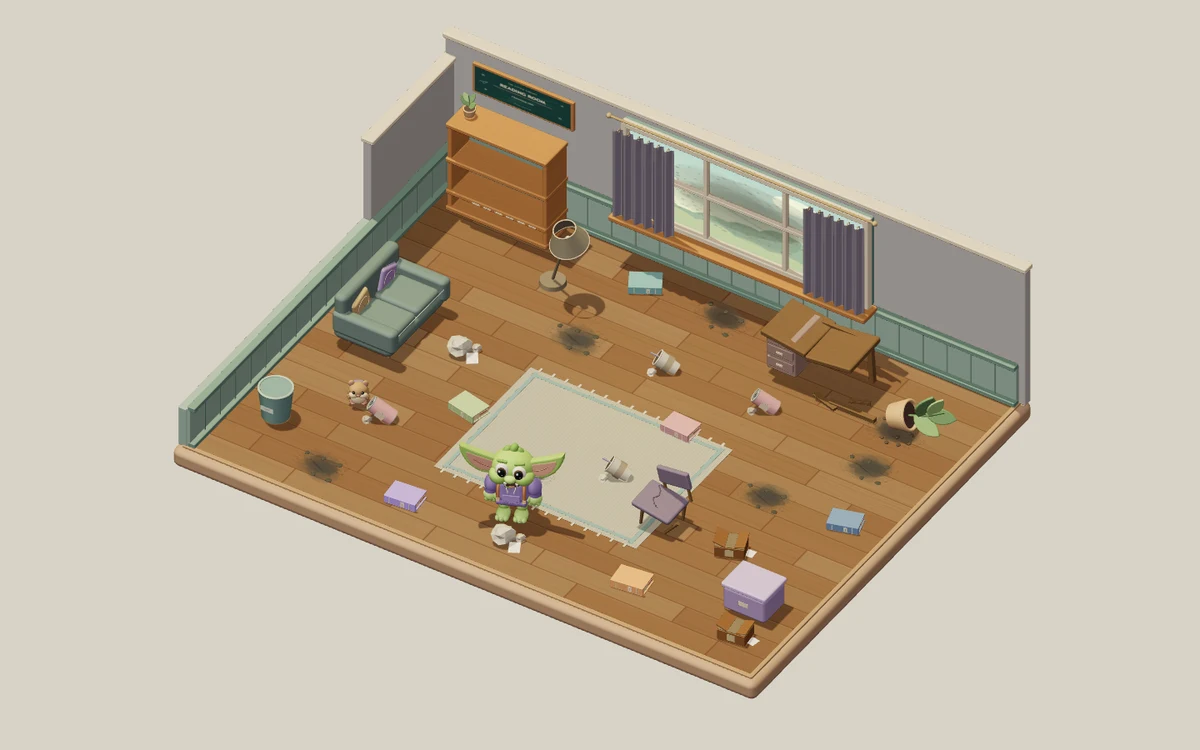
Restaura una sala de lectura, un invernadero y un estudio espacial con tu duende. Cada habitación tiene 24 tareas de limpieza y reparación. Las pausas de estudio cada tres tareas mantienen tu material presente en las tres habitaciones. Desbloquea herramientas y compara el antes y el después.
4,38 / 5 (50)
Gratis · Sin tarjeta de crédito
Acerca de Study Sweep
Study Sweep: Rescate de la sala te lleva por tres espacios 3D diseñados a mano: la Sala de lectura, el Invernadero secreto y el Estudio espacial. Un pequeño duende te ayuda a restaurar cada uno antes de pasar al siguiente. Cada sala tiene 24 tareas visibles: ocho restos de basura, seis libros fuera de sitio, seis zonas con polvo y cuatro reparaciones de muebles. Despeja el suelo, guarda los libros y haz que los muebles vuelvan a ser útiles. Cada tarea terminada cambia lo que ves y hace avanzar el contador de restauración. Completa la Sala de lectura para entrar en el Invernadero secreto y luego restaura el Estudio espacial para terminar el recorrido completo de 72 tareas.
Tus preguntas de estudio te acompañan durante toda la limpieza. Cada sala nueva empieza con tres tareas disponibles antes de una pausa de estudio. Después de cada tres tareas completadas, responde bien una pregunta para preparar las tres siguientes. Al terminar la última tarea de una sala, pasas a sus resultados sin otra pregunta. El polvo y los muebles dañados también necesitan herramientas: dos respuestas correctas desbloquean la Aspiradora y otras dos, el Kit de reparación. La basura y los libros no necesitan ninguna herramienta especial. Desbloquear una herramienta prepara tres tareas más, y las dos herramientas siguen desbloqueadas cuando pasas de una sala a otra. Las pausas de estudio periódicas continúan después de desbloquear las herramientas.
Todas las preguntas salen del mazo de StudyQuest que elijas, que continúa en las tres salas junto con tu diario de aprendizaje. La sala se pausa mientras lees, respondes o usas un menú, y no hay límite de tiempo para leer. Una respuesta incorrecta muestra la respuesta correcta y te ofrece una explicación antes de continuar; no hace avanzar el entrenamiento de las herramientas ni te deja saltarte una pausa de estudio obligatoria. Tu diario registra las preguntas que te han salido y sus respuestas correctas, incluidas las que necesitan otro repaso. Las respuestas correctas te dan XP en StudyQuest. Los temas de las salas y sus objetos son entornos 3D en tiempo real diseñados a mano, mientras que el material que eliges aporta las preguntas y los conceptos aprendidos.
Haz clic en el suelo para caminar, o haz clic en una tarea y el duende se acerca y empieza el trabajo adecuado cuando esté disponible. Con el teclado puedes moverte con WASD o las flechas y trabajar en lo que tengas cerca con la tecla E. En una pantalla táctil, toca las tareas o usa la palanca de movimiento. El menú de pausa incluye controles de sonido y de movimiento reducido. Cuando termines las 24 tareas de una sala, compara sus vistas de Antes y Después, repasa tu diario y continúa a la siguiente sala. Tus herramientas y tu progreso de estudio te acompañan. La aventura termina cuando las tres salas y las 72 tareas están restauradas. Después puedes disfrutar del espacio terminado o volver a jugar desde la Sala de lectura con una restauración nueva y el mismo material de estudio elegido.
Para quién es Study Sweep
Estudiantes que quieren preguntas de estudio frecuentes y sin límite de tiempo entre tareas visibles de limpieza y reparación. Tres salas temáticas, una lista de 24 tareas para cada una y las comparaciones de Antes y Después dan etapas claras a esta aventura en solitario.
Mejores materias para estudiar con Study Sweep
Vocabulario y definiciones
Las preguntas cortas de memoria encajan en las pausas de estudio periódicas entre cada grupo de tres tareas de restauración.
Conceptos de ciencias
La sala se pausa durante las preguntas, así que tienes tiempo para comparar términos y leer la explicación después de un error.
Historia y ciencias sociales
Las preguntas sobre personajes, acontecimientos e ideas de tus apuntes se pueden repasar entre tareas de restauración visibles.
Repaso variado para exámenes
El mismo mazo de estudio y el mismo diario de aprendizaje continúan en las tres salas, así que las preguntas anteriores siguen disponibles para repasar.
Cómo jugar a Study Sweep
Tres salas temáticas y 72 tareas de limpieza y reparación
Una respuesta correcta cada tres tareas mantiene el aprendizaje en marcha
Las herramientas desbloqueadas y tu diario te acompañan entre salas
Sin cronómetro: lee a tu ritmo y disfruta de cada sala terminada
Lo que aprenderás
Recuperación activa
Cada pregunta obliga a tu cerebro a recuperar información activamente, fortaleciendo vías neuronales y memoria a largo plazo.
Retroalimentación inmediata
Sabes al instante si tu respuesta fue correcta. La IA explica la respuesta correcta cuando fallas, convirtiendo errores en aprendizaje.
Motivación gamificada
Puntos, rachas y sistemas de progresión te mantienen enganchado más que el estudio tradicional. Estudias más porque se siente como jugar.
Cualquier materia
Sube cualquier material: biología, historia, matemáticas, idiomas, prep de exámenes. Si está en tus apuntes, se convierte en juego.
Detalles del juego
¿Listo para jugar a Study Sweep?
Sube tus apuntes, deja que la IA genere preguntas y empieza a jugar en menos de 2 minutos. Funciona con cualquier materia.
Sin tarjeta de crédito · Plan gratis disponible