Study Sweep Jogo de estudo com IA
Restaure uma sala de leitura, uma estufa e um estúdio espacial com seu goblin. Cada cômodo tem 24 tarefas de limpeza e reparo. Pausas de estudo a cada três tarefas mantêm seu material presente nos três cômodos. Desbloqueie ferramentas e compare o antes e o depois.
4,38 / 5 (50)
Grátis para jogar · Sem cartão de crédito
Sobre Study Sweep
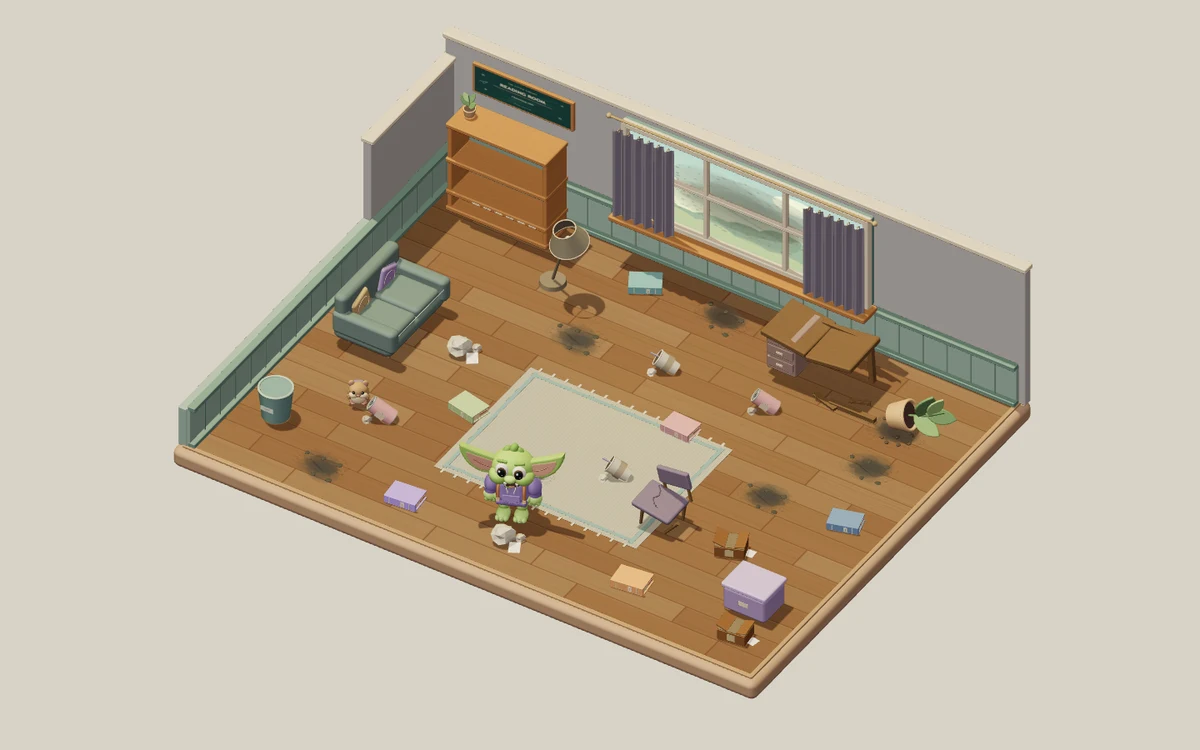
Study Sweep: Resgate da Sala leva você por três ambientes 3D criados à mão: a Sala de leitura, a Estufa secreta e o Estúdio espacial. Um pequeno goblin ajuda você a restaurar cada um antes de passar para o próximo. Cada sala tem 24 tarefas visíveis: oito pedaços de lixo, seis livros fora do lugar, seis manchas de poeira e quatro consertos de móveis. Limpe o chão, guarde os livros e deixe os móveis úteis de novo. Cada tarefa concluída muda o que você vê e avança o contador de restauração. Complete a Sala de leitura para entrar na Estufa secreta e depois restaure o Estúdio espacial para terminar a jornada completa de 72 tarefas.
Suas perguntas de estudo continuam durante toda a limpeza. Cada sala nova começa com três tarefas liberadas antes de uma pausa para estudar. A cada três tarefas concluídas, acerte uma pergunta para liberar as próximas três. Terminar a última tarefa de uma sala leva você aos resultados dela sem outra pergunta. A poeira e os móveis quebrados também precisam de ferramentas: duas respostas certas desbloqueiam o Aspirador, e mais duas desbloqueiam o Kit de reparos. Lixo e livros não precisam de ferramenta especial. Desbloquear uma ferramenta libera mais três tarefas, e as duas ferramentas continuam desbloqueadas quando você muda de sala. As pausas regulares para estudar continuam mesmo depois que você desbloqueia as ferramentas.
Todas as perguntas vêm do conjunto de perguntas do StudyQuest que você escolheu, que segue pelas três salas junto com o seu diário de aprendizagem. A sala pausa enquanto você lê, responde ou usa um menu, sem contagem regressiva no seu tempo de leitura. Uma resposta errada mostra a resposta certa e oferece uma explicação antes de você continuar; ela não avança o treino da ferramenta nem deixa você pular uma pausa de estudo obrigatória. Seu diário registra as perguntas que você viu e as respostas certas, inclusive as que precisam de uma nova olhada. Respostas certas rendem XP no StudyQuest. Os temas e objetos das salas são ambientes 3D em tempo real criados à mão, enquanto o material que você escolheu fornece as perguntas e os conceitos aprendidos.
Clique no chão para andar ou clique em uma tarefa para o goblin ir até ela e começar o trabalho certo quando estiver disponível. Pelo teclado, você se move com WASD ou com as setas e trabalha no que está por perto com E. Em uma tela sensível ao toque, toque nas tarefas ou use o analógico de movimento. O menu de pausa tem controles de som e de movimento reduzido. Quando as 24 tarefas de uma sala estiverem prontas, compare as vistas de Antes e Depois, revise seu diário e siga para a próxima sala. Suas ferramentas e seu progresso de estudo vão com você. A aventura termina quando as três salas estiverem restauradas e as 72 tarefas concluídas. Depois, você pode curtir o espaço pronto ou jogar de novo a partir da Sala de leitura, com uma restauração nova e o mesmo material de estudo escolhido.
Para quem é Study Sweep
Estudantes que querem perguntas de estudo frequentes e sem limite de tempo entre tarefas visíveis de limpeza e conserto. Três temas de sala, listas de 24 tarefas para cada uma e comparações de Antes e Depois dão etapas claras a essa jornada solo.
Melhores matérias para estudar com Study Sweep
Vocabulário e definições
Perguntas curtas de memorização combinam com as pausas regulares para perguntas entre cada grupo de três tarefas de restauração.
Conceitos de ciências
A sala pausa durante as perguntas, deixando tempo para comparar termos e ler a explicação depois de um erro.
História e ciências humanas
Perguntas sobre pessoas, acontecimentos e ideias das suas anotações podem ser revisadas entre uma tarefa de restauração e outra.
Revisão geral para provas
O mesmo conjunto de perguntas e o mesmo diário de aprendizagem seguem pelas três salas, mantendo as perguntas anteriores disponíveis para revisão.
Como jogar Study Sweep
Três salas temáticas e 72 tarefas de limpeza e reparo
Uma resposta certa a cada três tarefas mantém o aprendizado acontecendo
As ferramentas liberadas e seu diário acompanham você entre as salas
Sem cronômetro: leia no seu ritmo e aproveite cada sala concluída
O que você vai aprender
Recuperação ativa
Cada pergunta força seu cérebro a buscar a informação ativamente, fortalecendo as conexões neurais e a memória de longo prazo.
Feedback instantâneo
Saiba na hora se a resposta estava certa. Quando você erra, a IA explica a resposta correta e transforma o erro em aprendizado.
Motivação gamificada
Pontos, sequências e sistemas de progresso mantêm você engajado por mais tempo que o estudo tradicional. Você estuda mais porque parece brincadeira.
Qualquer matéria
Envie qualquer material: biologia, história, matemática, idiomas, preparação para provas. Se está nas suas anotações, vira jogo.
Detalhes do jogo
Pronto para jogar Study Sweep?
Envie suas anotações, deixe a IA gerar as perguntas e comece a jogar em menos de 2 minutos. Funciona com qualquer matéria.
Sem cartão de crédito · Plano grátis para sempre