Tug of War: The Team Quiz Battle Your Whole Class Plays at Once
A team quiz battle for the whole class. Students answer on their phones at their own pace, every right answer pulls the rope, and the losing team ends up in the mud.
About Tug of War
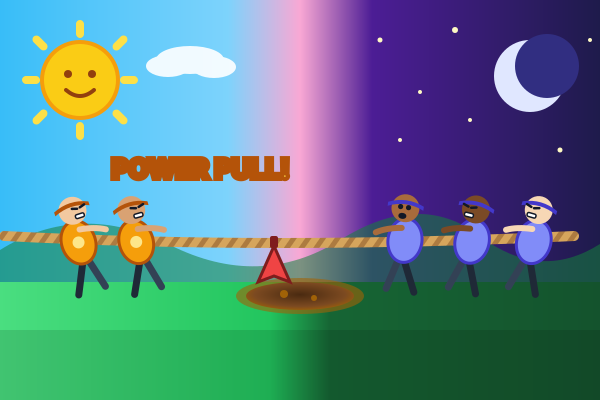
Tug of War turns your study set into a team battle for the whole class. The teacher puts the game on the projector, students join on their phones with a code, and the class splits into Team Sun and Team Moon. A rope stretches across a mud pit between the two teams, and every right answer pulls it a little closer to your side.
Every student answers on their own phone, at their own pace, and each one gets their own order of the questions. Nobody's question has a timer. Only the rope has a clock: a round lasts 90 seconds, or ends early when one team drags the other into the mud. Three right answers in a row make a Power pull, and six make a Mega pull.
Team size never decides the game. Each pull is shared out by how many teammates are answering, so a team of 8 pulls as hard as a team of 15 when its players answer as well. Guessing fast does not help either: after a wrong answer the right one is shown, and the player rests for a moment before the next question.
Between rounds the class huddles. The projector shows each team's hardest question from that round with the right answer, so everyone learns it before the next pull. The match is best of 3 rounds. At the end the losing team slides into the mud, the top pullers take a bow, and the teacher gets a class report with the share of right answers for every question and the wrong answer picked most often.
Students do not need an account: they go to studyquest.app/join, type the code or scan the QR code, and pick a nickname. If a phone drops off the wifi or the page reloads, the student lands back on their team. No class around? Practice solo as Team Sun against a team of three bots, at three strength levels.
Who It's For
Teachers who want the whole class answering at once, with teams, cheering and a quick look at the hardest questions between rounds.
Study Set Ideas
Review before a test
The huddle and the class report show exactly which questions the class still gets wrong.
Vocabulary and facts
Short multiple-choice questions keep the rope moving, so one round covers a lot of material.
Mixed-ability classes
Everyone answers at their own pace and pulls are shared out by team size, so every student counts.
Any subject you upload
The rope and the rules stay the same, only the questions change, so any material works.
How to Play Tug of War
The whole class plays at once, up to 60 students
Two auto-balanced teams, pulls shared out by team size
No question timer: answer at your own pace
A huddle between rounds and a class report for the teacher
What You'll Learn
Active Recall
Every question forces your brain to actively retrieve information, strengthening neural pathways and long-term memory.
Instant Feedback
Know immediately whether your answer was correct. AI explains the right answer when you get it wrong, turning mistakes into learning moments.
Gamified Motivation
Points, streaks, and progression systems keep you engaged longer than traditional studying. You study more because it feels like play.
Any Subject
Upload any study material: biology, history, math, language learning, exam prep. If it's in your notes, it becomes a game.
Game Details
Ready to Play Tug of War?
Upload your study notes, let AI generate questions, and start playing in under 2 minutes. Works with any subject.
No credit card required · Free forever plan available